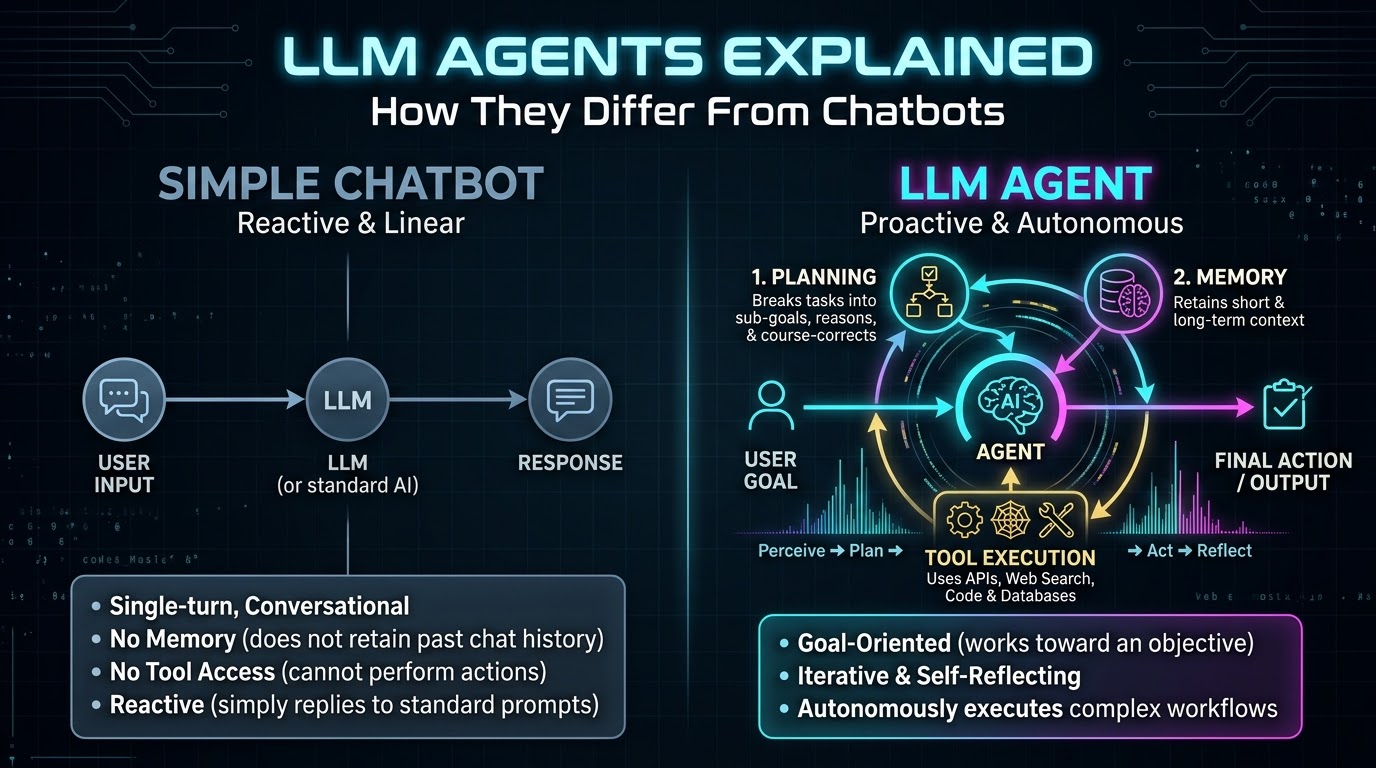
Chatbots answer questions. LLM agents go a step further: they decide what to do, use tools and finish tasks. That difference is why businesses are paying attention. This guide explains what LLM agents are, how they work, how they differ from chatbots, where they help, and how to adopt them safely.
LLM agents are software systems built around a large language model (LLM) that can plan steps, use tools such as databases and apps, keep track of context, and take actions to reach a goal. A chatbot mainly talks. An LLM agent talks and acts. Because agents can change real data, they need clear limits, testing and human oversight.
A large language model is an AI system trained on vast amounts of text to understand and generate language. On its own, it can write, summarize and answer questions. Agents add three things: the ability to use tools, the ability to plan, and the ability to act toward a goal.
For example, you might ask a support agent, “Refund the duplicate charge on order 1042.” A chatbot could explain the refund policy. An agent could look up the order, confirm the duplicate, start the refund within its limits, and notify the customer.
“A chatbot tells you what to do. An agent can do it for you, within the limits you set.”
Designs vary, but most of these agents share the same building blocks.
The model is the “brain.” It reads instructions and context, then decides what to say or do next.
A system prompt tells the agent its role, tone, goals and limits. Strong agents also have explicit rules about what they must never do.
Tools let the agent act: searching a knowledge base, checking inventory, updating a CRM, sending an email or booking a slot. Tools usually connect through APIs. Open standards such as the Model Context Protocol (MCP) aim to make these connections easier, though tooling evolves quickly.
Agents need context: the current conversation, relevant documents and sometimes past interactions. Short-term memory holds the current task. Longer-term memory can store preferences or history, with privacy controls.
Instead of answering once, agents run a loop: understand the goal, choose a step, use a tool, check the result, and decide what comes next. The loop continues until the task is done or the agent asks a person for help.
Good setups record every action and pause for approval before risky steps, such as large refunds or deleting records.
| Feature | Typical chatbot | LLM agent |
|---|---|---|
| Main job | Answer questions and guide users | Complete tasks toward a goal |
| Tool use | Limited or none | Central to how it works |
| Steps | Usually one reply per message | Multi-step plans and loops |
| Autonomy | Low | Higher, within set limits |
| Risk if wrong | Bad answer | Bad answer plus a wrong action |
| Setup effort | Lower | Higher: integrations, permissions, testing |
| Best for | FAQs, guidance, lead capture | Refunds, bookings, record updates, workflows |
The line between the two is blurry. Many modern chatbots use agents behind the scenes. For a broader view, see our guide to what an AI chatbot is.
Agents can read a request, look up the account, apply policy and resolve routine cases, then pass complex or sensitive ones to a person. A conversational AI chatbot or AI voice agent often provides the customer-facing layer.
Agents can monitor inventory, flag listing issues, update product data across marketplaces and draft customer messages. Pair them with our e-commerce management services for Amazon, Walmart, Etsy and eBay.
Agents can qualify inbound leads, enrich records, schedule meetings and send tailored follow-ups.
Agents can reconcile data, sort documents, route requests and keep your CRM clean. Our AI workflow agent service focuses on this kind of work.
Agents can gather information from approved sources, summarize it and prepare a draft for a human to review.
| Risk | What can happen | Safeguard |
|---|---|---|
| Hallucination | Confident but wrong information or actions | Ground answers in verified data; add validation checks |
| Excess permissions | Agent changes or deletes more than intended | Least-privilege access; read-only by default |
| Prompt injection | Malicious text in an email or web page hijacks the agent | Treat outside content as untrusted; restrict sensitive tools |
| Compounding errors | An early mistake carries through later steps | Checkpoints, step limits and human approval |
| Privacy exposure | Personal data shared or stored improperly | Data minimization, retention limits, disclosure |
| Cost and latency | Long loops get slow or expensive | Set budgets, time limits and monitoring |
For a structured approach, review the NIST AI Risk Management Framework and the OWASP guidance on LLM application risks. This is general information, not legal or security advice.
HighDreamsLLC is a Colorado-based AI and digital growth agency. We develop LLM agents, AI chatbots and voice agents, build workflow automation, create websites and apps, and manage e-commerce across Amazon, Walmart, Etsy and eBay. If you want to explore agents for your business, we can help you choose a safe first use case and build it step by step.
They are software systems built around a large language model that can plan steps, use tools such as databases, APIs and apps, remember context, and take actions to complete a goal, instead of only replying with text.
A chatbot mainly answers questions in conversation. An LLM agent can also decide what to do next, call tools, and carry out multi-step tasks such as checking an order, updating a record and sending a confirmation, usually within limits set by the business.
They can be, with safeguards. Limit permissions, require human approval for sensitive actions, test thoroughly, log every action and monitor results. Because agents can act, mistakes can have real consequences, so start small.
Common uses include triaging support requests, updating records, drafting and sending follow-ups, monitoring inventory or prices, summarizing documents, and routing leads. Start with a narrow, repetitive task that has clear rules.
Usually they take over repetitive steps and support staff rather than replace whole roles. People remain important for judgment, exceptions, relationships and oversight of the agent.
LLM agents turn language models from talkers into doers. That power is useful, but it needs structure: a clear task, limited permissions, solid testing and human oversight. Begin with one small workflow, measure what happens, and grow from there. Businesses that treat these systems as a careful, step-by-step upgrade tend to get lasting value.
Sources and further reading: NIST AI Risk Management Framework, OWASP Top 10 for LLM Applications. AI tools, standards and regulations change quickly; verify current details with the original sources. This article is general information, not legal or security advice.