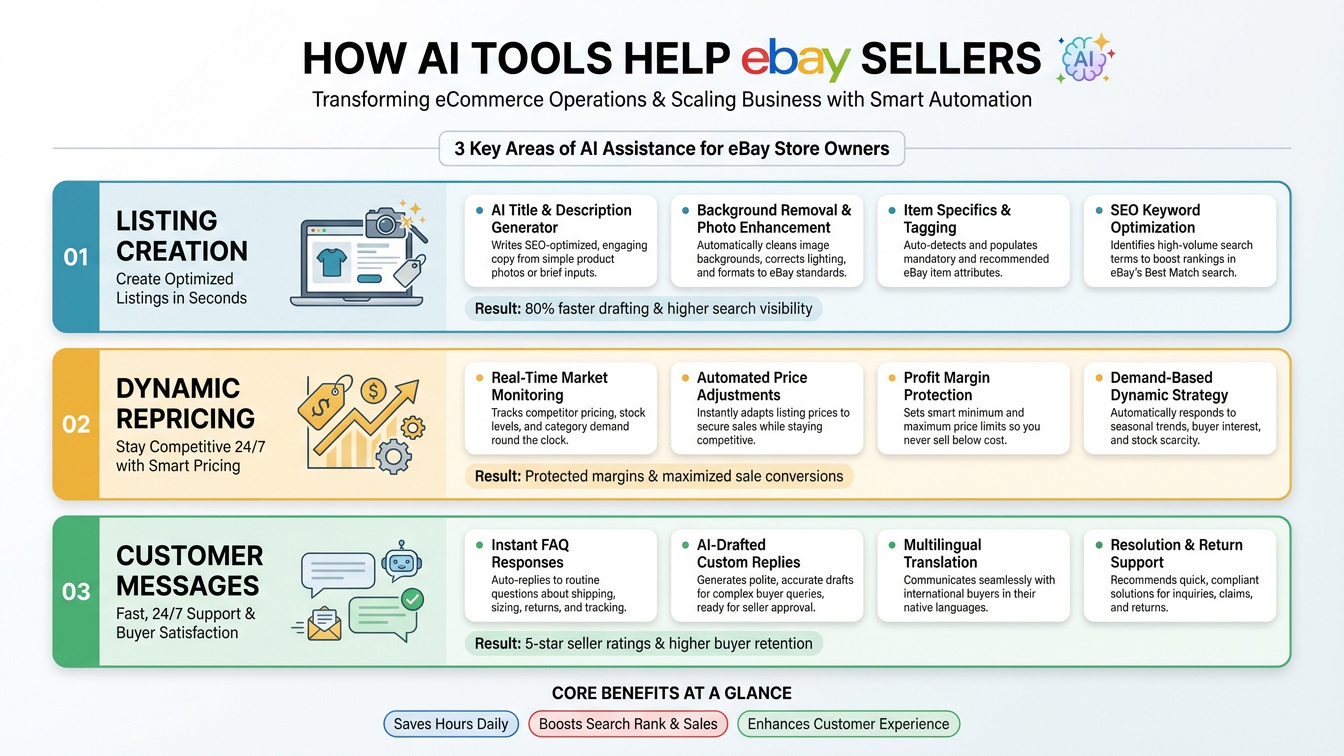
AI tools for eBay sellers now cover the three jobs that eat most of a seller’s day: creating listings, pricing items, and answering buyer messages. eBay has built some of these tools itself, third-party apps fill the gaps, and a few rules decide what you can safely automate. This guide explains what each tool does, where it falls short, and how to use it without putting your account at risk.
AI tools help eBay sellers by turning a photo into a draft listing (title, description, category and details), by supporting smarter pricing through sold-price data, Best Offer rules and dynamic ad rates, and by suggesting replies to routine buyer questions. They save the most time on repetitive work, but you should review every AI-generated listing and message for accuracy, since eBay holds the seller responsible for what is published.
| Task | What AI can do | eBay-native option | Main watch-out |
|---|---|---|---|
| Listing creation | Identify the item from a photo, draft title, description and details | Magical Listing, photo-first listing in the eBay app | Misidentification and wrong categories; you must review |
| Pricing research | Summarize sold prices, ranges and trends | Product Research (formerly Terapeak) | Past sales do not guarantee future prices |
| Offers and ad rates | Apply price rules automatically | Best Offer limits; Promoted Listings dynamic ad rate | Rules can leave margin on the table if never reviewed |
| Buyer messages | Suggest answers to common questions | eBay AI assistant for messaging | Contact policy limits bulk, unsolicited and off-eBay messages |
These are eBay’s own figures and they cover its AI features in general, not one tool. The 50% reduction came from UK testing before the November launch, so it describes the broader AI listing flow, not the latest update. Earlier, in 2023, eBay reported that about 30% of US sellers using the app on a given day tried its text-based AI description feature, and over 95% of those who tried it used the AI-generated description. Treat all of this as vendor-reported data.
eBay’s Magical Listing tool began in 2023 as a way to generate titles and descriptions. It now starts from a photo: the seller takes or uploads a picture, AI identifies the item and fills in listing fields, and the seller reviews the draft and publishes. eBay’s November 11, 2026 update expanded this photo-first flow to sellers in the US, UK, Germany, France, Italy and Australia. The original 2023 announcement also said the tool could suggest a listing price and shipping cost.
Accuracy is uneven. Value Added Resource, an independent seller-focused publication, tested the November release and reported that the AI misidentified a mousepad as a turtle-shaped refrigerator magnet, chose the wrong category and left the description blank. It also reported that identification remains inconsistent and some fixes are manual. That is one outlet’s test, not a measured error rate, but it shows why review is not optional.
Use AI for the first draft and your own knowledge for the facts. For brand, model, size, condition and compatibility, trust the item in your hand, not the generated text.
eBay’s item description policy requires accurate descriptions, and violations can lead to removed listings, warnings, restrictions or suspension. Use the table below as a review list.
| Check | Why it matters |
|---|---|
| Item is identified correctly | A wrong product leads to returns and “not as described” cases |
| Condition matches in the title, description and item specifics | eBay’s policy says condition must match the item and be consistent |
| Category is right | Wrong categories hurt visibility and can breach listing rules |
| Item specifics are complete and correct | Required specifics must be accurate; brand, UPC and MPN cannot use placeholders when the manufacturer has supplied them |
| Description is not blank or generic | Buyers need flaws, measurements and what is included |
| Claims are supported | Claims such as “Made in USA” must be accurate and supported by evidence |
| Photos show the real item | Background-enhancement tools should not hide flaws |
Pricing is where sellers most want a “set and forget” tool. Based on the eBay pages I reviewed, eBay’s built-in pricing automation is narrower than many sellers assume. I could not confirm a native feature that automatically reprices all your listings against competitors. What eBay does offer is below.
| Tool | What it does | Limits to know |
|---|---|---|
| Product Research (formerly Terapeak) | Shows sold listings, average sold price, sold price range and trend, including accepted Best Offer prices; eBay says it gives access to three years of sales and pricing data | Research only; you still set the price. Available on desktop to sellers opted in to Seller Hub |
| Best Offer auto-accept and auto-decline | Accepts offers at or above your upper limit and declines offers below your lower limit; offers in between wait for your decision | Fixed-price listings only; the upper limit must be below your Buy It Now price; not available in some categories |
| Promoted Listings Standard, dynamic ad rate | Updates your ad rate daily to eBay’s suggested rate, based on item attributes, seasonality, past performance and competition | Adjusts the ad fee, not your item price. You pay a percentage of the sale only when an item sells after a click; rates range from 2% to 100% |
Many sellers use outside repricing and listing-management tools that connect through eBay’s APIs. These can change prices on a schedule or in response to rules. Before you commit, check three things: whether the tool uses eBay’s official API, what rules you can set, and whether its terms fit eBay’s User Agreement (see the rules section below). I could not find eBay guidance that specifically addresses repricing tools, so I cannot confirm how it treats them.
Most buyer messages repeat the same questions: Is it still available? What are the measurements? When will it ship? eBay’s November 2025 holiday story describes an AI assistant for messaging that proposes answers to frequent buyer questions about item details or shipping, aimed at quicker replies and less workload. It was unveiled at eBay OPEN25, and the story quotes a seller using it, but it gives no broader rollout details.
| Message type | Automation level | Reason |
|---|---|---|
| Item availability, size, measurements | AI-suggested reply, quick human check | Facts are in the listing, but errors cause returns |
| Shipping time and tracking | Templates or suggested replies | Repetitive and easy to standardize |
| Offers and negotiation | Rules for clear cases; human for the rest | Use Best Offer limits; judgment still matters |
| Returns and “not as described” claims | Human only | Disputes affect your seller standing and need judgment |
| Complaints, damaged items, upset buyers | Human only | Tone and fairness matter more than speed |
eBay’s member-to-member contact policy (the version I reviewed is on the UK site) allows messages that are reasonably necessary to complete a transaction, answer a question or provide customer service. It prohibits:
So an AI reply that pushes a buyer to your own website, or a canned message blasted to past customers, can put your account at risk. Keep every message focused on the transaction.
| Week | Focus | Tasks |
|---|---|---|
| Week 1 | Listings | Try the photo-first flow on 10 to 20 easy items; log every error you have to fix |
| Week 2 | Pricing | Check Product Research for your top sellers; set price floors and Best Offer limits |
| Week 3 | Messages | Build answers for your ten most common questions; use AI suggestions with a human check |
| Week 4 | Measure and decide | Compare time per listing, returns and sell-through; keep what works, drop what does not |
Sellers who outgrow manual work usually need a joined-up setup, not another standalone app. Typical projects include the following. Results depend on your catalog and systems, so each starts from a specific bottleneck.
HighDreamsLLC is a Colorado-based AI and digital growth agency. The team builds AI chatbots and voice agents, automates workflows, develops websites and apps, builds Shopify and WordPress stores, and manages e-commerce across Amazon, Walmart, Etsy and eBay. According to the company, it has delivered AI chatbots and voice agents for 150+ clients worldwide and moves projects from idea to production in 1 to 4 weeks, with human escalation built in from the start. Learn more about HighDreamsLLC.
Tell us where your time goes, whether that is listing, pricing, messages or inventory, and we will recommend a practical, policy-safe way to automate it.
They turn photos into draft listings, speed up research into sold prices, apply pricing rules such as Best Offer limits and dynamic ad rates, and suggest replies to common buyer questions. eBay reports that more than 10 million sellers have used its AI features.
You take or upload a photo, AI identifies the item and fills in details such as the title, description and category, and you review the draft before publishing. eBay expanded the photo-first flow to the US, UK, Germany, France, Italy and Australia in November 2026. Always check the result, since one independent test found misidentified items and blank descriptions.
In the eBay pages I reviewed, I could not confirm a native feature that automatically reprices all listings against competitors. eBay does offer Product Research for sold-price data, Best Offer auto-accept and auto-decline limits, and a dynamic ad rate for Promoted Listings Standard that updates your ad fee daily. Third-party repricers exist, so check their terms against eBay’s rules.
Yes for routine questions, if you keep messages focused on the transaction. eBay has an AI assistant that proposes answers to common buyer questions. Its contact policy prohibits unsolicited promotion, bulk or automated messaging that disrupts its communication features, off-eBay deals, and sharing contact details or links. Handle returns and complaints yourself.
eBay’s updated User Agreement, effective February 20, 2026 for existing users, bars automated access to its services without prior express permission, and names buy-for-me agents and LLM-driven bots. The coverage I reviewed does not explain how it applies to seller tools, so use eBay’s own tools and apps that connect through official APIs, and read the full agreement.
AI can take the repetitive work out of selling on eBay: drafting listings, informing prices and answering routine questions. It cannot take responsibility for accuracy or replace judgment on disputes. Start with listing drafts you review carefully, set price floors before you automate any rule, keep messages transactional, and stay inside eBay’s policies. Measure the time you save, then expand only what works.
Figures about eBay’s AI usage are eBay-reported. Policy summaries reflect the pages reviewed on the dates above; eBay changes its rules and features often, so confirm current terms in Seller Hub.